
Today we'll look at measuring memory capacity in the cluster, just a reminder that in Friday's blog
we discussed where ballooning is persistent (rather
than an occasional spike), and that changes
should be made in order to ensure there is enough
RAM available for the VMs in the cluster.

I explained that ballooning itself has an overhead on the hypervisor and as such there is the potential to impact performance for the host. Changes don’t necessarily have to be more RAM installed. The very first thing to consider is if any VMs have been created and “forgotten” about.If we look the cluster as a whole we can see a significant event at the same time the previous VM saw the balloon inflate in memory.

Shared memory plummets, this causes an increase in the demand on memory and, in turn this causes the balloon driver (memory control), to consume more memory, and the swapped memory to increase.
Then, shared
memory slowly recovers. The process to identify shares
pages only checks
a set number of pages each interval. So it takes a while to identify all the shared
pages and free up
the space taken by duplicates.
What caused the shared memory to drop so much? Windows updates and a reboot. When a VM starts every page is unique until a duplicate is identified, which takes a short while.

I explained that ballooning itself has an overhead on the hypervisor and as such there is the potential to impact performance for the host. Changes don’t necessarily have to be more RAM installed. The very first thing to consider is if any VMs have been created and “forgotten” about.If we look the cluster as a whole we can see a significant event at the same time the previous VM saw the balloon inflate in memory.
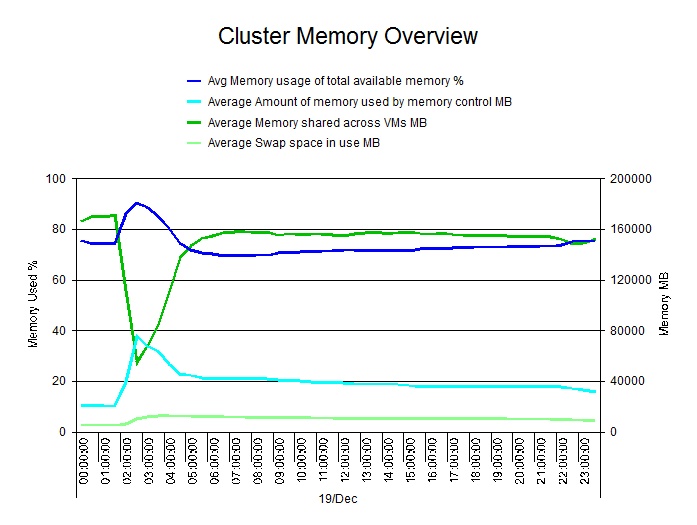
Shared memory plummets, this causes an increase in the demand on memory and, in turn this causes the balloon driver (memory control), to consume more memory, and the swapped memory to increase.
What caused the shared memory to drop so much? Windows updates and a reboot. When a VM starts every page is unique until a duplicate is identified, which takes a short while.
The question we tend to be asked is:
How can we model what will happen to our VMware clusters? Typically the
underlying questions are more like:
When do I need to buy more hosts?
As in: I need to figure out my budget for the next 12 months, and I’ve
no idea if there needs to be any money set aside for hardware purchases.
Will planned projects fit?
I know we have new things planned but I don’t know if they are going to
impact our forecasts for the hardware we may need.
How many more VMs can we provision?
I’m used to talking about rack space and space in the datacenter, so
give me something I can understand to determine how much space is left.
I've run a webinar on VMware Cluster Planning and you can listen to the recording here
On Wednesday I'll be looking at measuring Disk Storage Latency and I'll also be broadcasting live with our 'Top 5 VMware Tips for Performance and Capacity', if you haven't registered for this event then you've still got time to do so.
Phil Bell
Consultant


