Showing posts with label Charles Johnson. Show all posts

Wednesday, 13 September 2017

Managing your IBM z System licensing charges - Ways to Manage Cost (5 of 5)

Today I'll take a look at ways to manage cost and provide a summary of my series.
Some of the ways in which you can look at reducing or managing costs are below and we'll start with zIIP Processors.

zIIP Processors

        Specialty processors for offloading work

        Workloads using zIIP Processors do not factor into the License Charges

        Originally setup for DB2 in 2004

        Work run on zAPPs can run on zIIPs (i.e. Java)

        Third party products can use zIIPs with API licensed from IBM

        Talk to your vendors

Bottom line

        Lowers cost of computing for eligible workloads
To Cap or not to Cap?

Capping the Environment is a means of Manual or Automatic control of resources to ensure the MLC is stable but optimize the system performance.Modification of the LPARs Defined Capacity (DC) to account for workload behavior and the needs of all the LPARs.
Soft Capping Manually

There are some issues with Soft Capping manually:

        Personnel constantly monitoring
        Adjustments may not be made in time
        Possible errors causing unsuspected results
Soft Capping – Automating the Process
Automating Soft Capping makes the process much easier.
        The LPARs’ DCs (Defined Capacity) are dynamically modified by taking into account the behavior and needs of all the LPARs.
        When one LPAR requires capacity to handle an instantaneous workload increase, its  DC can be dynamically increased, temporarily, while other less- busy LPARs can have their DCs reduced  temporarily.
        When the demand for extra capacity has passed, all of the LPAR DCs are returned to their normal levels, based on the CPC DC aggregate.
        Software tools are available to assist in the process
Summary
In summary, in order to manage your IBM z System licensing charges you need to:
        Understand the components of the MLC
        Understand your negotiated pricing mechanism

Check out our Resources section for some great white papers and on-demand webinars on z Systems  https://www.metron-athene.com/resources/index.asp

Charles Johnson
Principal Consultant


Monday, 11 September 2017

Managing your IBM z System licensing charges - Reporting to manage your monthly license charges(4 of 5)


There are many Reporting Processes but those that are useful in helping you manage your monthly license charges are below:
        Analyze the Peak Workloads

        Review workload placement - can workloads be combined onto a single LPAR?

        zIIP processor usage
Some examples below of the type of reports you can create, these have been produced using our athene® ES/1 product.

athene® ES/1- Rolling 4 Hour Average

athene® ES/1- Rolling 4 Hour Average w/ Service Classes

How to calculate MLC
        Calculation is made for the period from the 2nd day of the month to the 1st day of the next month.
        MLC is charged based on the maximum value of total R4HA MSU of all LPARs during the calculation period.
        Charge for each IBM software product is made for the period while the product is running. (Except z/OS)
SCRT – Sub-Capacity Report Tool

athene® ES/1 provides all the information used with the SCRT(Sub Capacity Report Tool).  The information provided is shown from the LPAR and Product perspective.
Shown on the report are the highest and second highest values and the date/time they occurred. 

Sample Charts for IBM MLC

athene® ES/1 product usage
Helping you to correlate software charges and application usage.
Business Transactions vs. CPU Usage – Change chart 

On Wednesday I'll conclude my series with a look at the way you can manage costs, on that day I'll also be broadcasting live with my 'Top 5 z Systems Capacity Issues' - make sure you register for your place. 
Charles Johnson
Principal Consultant


Friday, 8 September 2017

Managing your IBM z System licensing charges - What is Mobile Workload Pricing and its affect? (3 of 5)

Defining Mobile Workload Pricing

Mobile Workload Pricing was created by IBM in 2014 as mobile applications began to develop within organizations, with more transactions being mobile based, a break is given based on certain criteria.
      Mobile Workload Reporting Tool(MWRT) was developed to provide the calculations
        Based upon Rolling 4 Hour Average, then discounts applied
MWRT will calculate the 4-hour rolling average of the reported mobile transaction general purpose processor time consumed by the Mobile Workload Pricing Defining Programs and subtract 60% of those values from the traditional sub-capacity MSUs for all sub-capacity eligible programs running in the same LPAR(s) as the mobile workloads, on an hour-by-hour basis, per LPAR. The program values for the same hour are summed across all of the LPARs (and any z/OS guest systems running under z/VM®) in which the program runs to create an adjusted sub-capacity value for the program, for the given machine, for each hour. MWRT will determine the billable MSU peak for a given program on a machine using the adjusted MSU values.
On Monday I'll be talking about using reporting to manage your monthly license charges. In the meantime don't forget to sign up for my live webinar 'Top 5 z Systems Capacity Issues' on Sept 13  

Charles Johnson
Principal Consultant


Wednesday, 6 September 2017

Managing your IBM z System licensing charges - Types of License Charges (2 of 5)

IBM uses a variety of license models and below I've given a brief description of the types of license charges you'll likely come across.

Advanced Workload License Charges (AWLC), including Integrated Workload Pricing (IWP), when appropriate
When you elect AWLC for a particular operating system on a CPC, all of that operating system family's sub-capacity eligible MLC products are licensed under AWLC on that CPC. Non-sub-capacity eligible MLC products are considered FWLC products and their pricing is a fixed, monthly charge unrelated to the capacity of the CPC on which they run. Sub-capacity AWLC pricing applies to eligible z/OS® and z/TPF software products and their associated middleware products when running on a zEnterprise® EC12 (zEC12) or zEnterprise 196 (z196) CPC. Sub-capacity AWLC pricing also applies when running on a zEnterprise BC12 (zBC12) or zEnterprise 114 (z114) CPC, but only if that CPC is in an actively coupled Parallel Sysplex® that consists only of zEnterprise CPCs. 
More information about AWLC pricing is available at www.ibm.com/systems/z/swprice/mlc/awlc.html. For details about IWP, see the SCRT user's guide, Using the Sub-Capacity Reporting Tool.

Integrated Workload Pricing (IWP) is an enhancement to AWLC that enables qualifying z/OS customers to add a selected set of workloads to an existing LPAR without increasing the sub-capacity value of other products already running in that LPAR.
Entry Workload License Charges (EWLC)

When you elect EWLC pricing for a particular operating system on a CPC, all of that operating system family's MLC products that are sub-capacity eligible are licensed under EWLC on that CPC. The MLC products for that operating system on that CPC that are not sub-capacity eligible are charged a capacity-based price using the zELC pricing metric (for z800 CPCs) or the Tiered EWLC pricing metric (for z10™ BC, z9® BC, and z890 CPCs).

More information about EWLC pricing is available at www.ibm.com/systems/z/swprice/mlc/ewlc.html.
Advanced Entry Workload License Charges (AEWLC)

When you elect AEWLC for a particular operating system on a CPC, all of that operating system family's sub-capacity eligible MLC products are licensed under AEWLC on that CPC. The MLC products for that operating system on that CPC that are not sub-capacity eligible are charged a capacity-based price using the Tiered EWLC pricing metric. Sub-capacity AEWLC pricing applies to eligible z/OS, z/TPF, and z/VSE® software products and their associated middleware products when running on a zBC12 or z114 CPC.

Integrated Workload Pricing (IWP) is an enhancement to AEWLC that enables qualifying z/OS customers to add a selected set of workloads to an existing LPAR without increasing the sub-capacity value of other products already running in that LPAR.

More information about AEWLC pricing is available at www.ibm.com/systems/z/swprice/mlc/aewlc.htmlmlc/aewlc.html. For details about IWP, see the SCRT user's guide, Using the Sub-Capacity Reporting Tool.

Midrange Workload License Charges (MWLC)

When you elect MWLC pricing for the z/VSE operating system on a CPC, those z/VSE MLC products that are sub-capacity eligible are licensed under MWLC on that CPC. MWLC pricing applies only to the z/VSE (Version 4 or higher) operating system and certain z/VSE middleware programs. On System z10® BC or System z9® BC CPCs, all other z/VSE programs will be priced according to Tiered Entry Workload License Charges (TWLC). On zEnterprise EC12, zEnterprise 196, System z10 EC, or System z9 EC CPCs, all other z/VSE programs will be priced according to either Flat Workload License Charges, Graduated Monthly License Charges, or Extended License Charges.

More information about MWLC pricing is available at www.ibm.com/systems/z/swprice/mlc/mwlc.html.
System z New Application License Charges (zNALC)

zNALC is a monthly license charge pricing metric available on IBM® z/Architecture® servers running z/OS and offers a reduced price for z/OS on LPARs where qualified applications are running. zNALC pricing applies to the z/OS base feature and z/OS priced features (with the exception of HCM and HLASM Toolkit, which have flat pricing). zNALC is available for z/OS on LPARs dedicated to qualified applications, among other requirements. Similar to Workload License Charges and Entry Workload License Charges, customers may implement zNALC in either full capacity or sub-capacity mode.

Any logical partition (LPAR) that is designated as a zNALC LPAR must follow the naming convention ZNALxxxx where xxxx is any letters or numbers. Alternatively, customers who prefer not to change LPAR names to qualify for zNALC pricing (and are running z/OS V1.6 or later) can specify the LICENSE=ZNALC IPL parameter in the active IEASYSxx PARMLIB member to indicate a zNALC system. The LICENSE=ZNALC IPL parameter will be available through APAR OA20314. However, the complete zNALC solution for the SMF data collected from a z/OS system initialized in this manner requires SCRT V14.1.0 or higher.

Select Application License Charges (SALC)

SALC pricing is available solely for WebSphere® MQ for System z and only on CPCs with one of the sub-capacity MLC pricing metrics. It is designed to allow customers to license MQ under product utilization rather than the sub-capacity MLC pricing metrics. SCRT still reports MSU values for these products but the reported values are not used to calculate the license charges.
On Friday I'll be looking at Mobile Workload Pricing and it's affect.
Charles Johnson
Principal Consultant

Monday, 4 September 2017

Managing your IBM z System licensing charges - Monthly license charge components ( 1 of 5)

Monthly license charge components
z System license charges are a large component of the IT budget so this blog series will be looking at what you can do to manage those costs efficiently. I'll be covering how to stay on top of the charges throughout the month, what safeguards are in place to control the cost and what potential solutions, remedies and actions can be taken.
I'll start with a look at the type of license charges.
Types of License Charges

        MLC or WLC (Monthly or Workload License Charges)

       The charge is based upon usage of an LPAR

       Aggregates usage for the complete environment

       MSUs of z Systems Subsystem Components consumed
When you elect WLC pricing for a particular operating system on a CPC, all of that operating system family's MLC products are licensed under WLC on that CPC. Sub-capacity eligible MLC products are called Variable Workload License Charges (VWLC) products. Non-sub-capacity eligible MLC products are called Flat Workload License Charges (FWLC) products and their pricing is a fixed monthly charge unrelated to the capacity of the CPC on which they run.

        CMLC (Country Multiplex License Charges) or CMP (Country Multiplex Pricing)

       Sub-capacity offering that allows clients to use their z Systems capacity within a given country with the objective of creating a flexible, country-wide z Systems platform.
Clients can configure and balance workloads more easily without the constraints of Sysplex aggregation rules and many of the limitations of previous reporting methodologies.

A Multiplex is the collection of all eligible IBM z Systems machines or Sysplexes or both within a single country, measured as one machine for purposes of software sub-capacity reporting.

On Wednesday I'll be looking at the types of license in more detail. In the meantime don’t forget to sign up for my webinar ‘Top 5 z Systems® Capacity Issues on September 13th https://www.metron-athene.com/services/webinars/capacity-management-webinars.html
Charles Johnson
Principal Consultant


Thursday, 31 August 2017

Top 5 z System Capacity Issues

As Information Technology continues to evolve within enterprises, such as cloud and virtualization, there is one constant in the IT infrastructure that doesn’t change.  That constant is the z Systems® mainframe. 

Many organizations continue to rely on the mainframe for the heavy lifting of data in various business applications.  The subsystem components of CICS, DB2, MQ Series and IMS continue to feed not only legacy applications but also new multi-tier applications.  As the mainframe operating system continues to develop, you are seeing more functionality added to provide a better user experience. 
With all these changes and innovations, there are challenges that need consideration relating to Capacity Management on the mainframe.

I'll be running a webinar on September 13 which will provide information to assist you, discussing  the Top 5 Performance and Capacity Management Challenges for IBM z Systems®.


Some of the topics I'll be covering are:

  • What has happened in the past 12 months with the mainframe?
  • How are organizations managing the mainframe capacity?
  • The Top 5 performance and capacity z Systems® challenges facing organizations
  • The impact of the Cloud on mainframe
  • What is new with the z14
Register for your place now
https://www.metron-athene.com/services/webinars/capacity-management-webinars.html

Charles Johnson
Principal Consultant

Monday, 29 May 2017

No one should forget the mainframe

Once seen as the lumbering beast in the background, now acknowledged by those in the know as the fastest, most secure, tools rich large server there is. Metron’s Acquire for zOS data capture facility is a non-intrusive, zero impact performance data capture tool, gathering relevant performance and capacity metrics from SMF/RMF records.

It’s also child’s play to implement for anyone with a zOS background.

Our athene® ES/1 offers a range of features to enable you to analyze z/OS performance across your entire estate, report and create trends of behavior and analytically model future scenarios to optimize configurations and expenditure.
athene® ES/1 allows an enterprise to optimize on-going capacity, minimize over-spending on hardware, avoid the costs of performance crises, guarantee service levels, and alert on trends to know when a capacity issue will begin to emerge.
athene® ES/1 modelling capabilities help you to avoid potential performance problems and evaluate tuning and management strategies well in advance, not in crisis mode.

We’re offering one FREE System z Capacity Audit and Projection service per organization for a limited period.

To use the download to collect and return data for a FREE z/OS Capacity Audit and Projection visit 


Charles Johnson
Principal Consultant

Monday, 3 April 2017

Capacity Management Maturity Webinar Series – Initial to Repeatable

We start our webinar series on April 12 by taking a look at the lowest level of CMMI process maturity, Initial.

Where do you start when attempting to address how mature a process within your organization?

Can you:
  • Clearly identify whether a Capacity Management process exists?
  • Derive and demonstrate understandable output from it?
  • Illustrate how the process works through supporting documentation?
  • Demonstrate control of the inputs to the process?
  • Guarantee you’re not losing time through a variable and undefined approach?
If you answer no or maybe to most of these, then it's possible that your Capacity Management process is at the Initial maturity level. Moving up to the Repeatable level will benefit you and your business by delivering relevant capacity management information in a consistent manner.

Join us on the start of this process maturity series as we take a deep-dive into practical steps you can take that will enhance your current activities to ensure that core capacity management information is delivered every time – the Repeatable level of the Capacity Management Maturity model.

Register for your place on our webinar now

Wednesday, 15 March 2017

Adapt your capacity process to support Cloud

Potentially there are a large number of areas within a “standard” capacity process that need to be adapted to support Cloud solutions, but based on experience I believe the following topics represent the key areas.

  • Process interfaces
  • Tooling and monitoring
  • Scope and Maturity

To effectively manage the capacity of “The Cloud” stronger or at least redefined process interfaces will be required.  Closer links with financial processes will be key to understanding the costs associated with the various options Public, Private, Hybrid etc and using this information to assess which will best meet the needs of the business.  The determination of these costs and sizing the environment correctly will be critical in ensuring that using “The Cloud” actually pays. 

Strong configuration and change processes will also be essential in tracking all elements of a service with the focus moving away from the component level information and towards the interconnectivity between these components. 

I believe the relationship with Service Level management will require increased visibility when transitioning to the cloud, both from the perspective of managing the customer expectations and in capturing and documenting key service level performance metrics.  A keen insight into both the service architecture and which Cloud implementation is best suited will be essential in ensuring the required service levels are continually met during and after any transition.  As the popularity of public clouds expands, demand management as providers over commit resource to drive down costs and the available Capacity will become far more of an issue and careful stewardship of the performance targets will be a valuable asset.


The tooling and monitoring requirements will need to be re-evaluated prior to moving to a Cloud implementation  as the traditional capacity focus at the component level will become less important,  with an aggregated service view being key to understanding the service performance and usage.  When selecting a tool try to ensure that it will monitor across the Enterprise and have the flexibility to import a wide variety of data sources.  These information sources can then be used to provide a unified reporting portal to assist in capacity monitoring and planning for the Cloud, service and underlying components.  In a cloud implementation rather than the components being the first bottleneck it is likely the network will be the focal point for initial performance monitoring and planning; more specifically the network links between your organisation and the cloud provider.


Ultimately I believe the biggest changes for the capacity management process will be the perceived scope of the process and the required maturity.  In my experience as a consultant working for a number of large scale organizations the majority will have a detailed understanding of the component level side of the business i.e. the servers, a degree of knowledge at the service level, but little knowledge of the business and financial aspects.  To successfully manage a Cloud implementation that meets the required service levels and provide actual financial savings, the process will need to cover all aspects of both the service and the underlying infrastructure, including networks and potentially facilities.


A detailed understanding of the business needs and drivers and again how these will relate to services and infrastructure is essential in a Cloud environment and to a lesser degree any large scale virtualization project.

Achieving this level of maturity and integration presents a considerable challenge for a capacity management team, but if achieved will benefit both the business and raise the profile of capacity management and ITIL immeasurably.


Come along to our free webinar on ‘Cloud Capacity Management’ this Wednesday

Charles Johnson
Principal Consultant

Monday, 13 March 2017

Cloud Capacity Management

Capacity Management continues to evolve as a practice with new environments in IT.

The inclusion of the Cloud infrastructure within IT requires the Capacity Management discipline to be extended. There are several variables in dealing with Cloud Capacity Management.

Many of them depend on where the Cloud infrastructure is hosted and the type of control a user has over the environment. On-Premise hosting, Hybrid hosting or Cloud provider hosting fit into the equation.

I'm presenting a webinar on March 15 which will discuss the variables that you need to consider when extending your Capacity Management to the Cloud.

I'll be looking at:
  • Capacity Management in general
  • The variables introduced by the Cloud
  • An overview of the most prominent Cloud offerings
  • How to plan to move your environment into the Cloud
  • What metrics you need to capture for the Cloud Infrastructure
  • Reporting Examples

Don't forget to join me, you can register for your place now
Charles Johnson
Principal Consultant


Thursday, 14 July 2016

VMware, Virtual Center Headroom (17 of 17) Capacity Management, Telling the Story

Today I’ll show you one final report on VMware, which looks at headroom available in the Virtual Center.

In the example below we’re showing CPU usage. The average CPU usage is illustrated by the green bars, the light blue represents the amount of CPU available across this particular host and the dark blue line is the total CPU power available.
 
VMware – Virtual Center Headroom


We have aggregated all the hosts up within the cluster to see this information.
We can see from the green area at the bottom how much headroom we have to the blue line at the top, although actually in this case we will be comparing it to the turquoise area as this is the amount of CPU available for the VM’s.
This is due to the headroom taken by VMkernel which has to be taken in to consideration and explains the difference between the dark blue line and the turquoise area.
 
Summary

To summarize my blog series, when reporting:

        Stick to the facts

        Elevator talk

        Show as much information as needs to be shown

        Display the information appropriate for the audience

        Talk the language for the audience

….Tell the Story
Hope you've enjoyed the series, if you have any questions feel free to ask. If you're interested in VMware Capacity Management don't forget to book on to our workshop http://www.metron-athene.com/services/online-workshops/index.html#vmwarevsphere
Charles Johnson
Principal Consultant


Tuesday, 12 July 2016

VMware Reports (16 of 17) Capacity Management, Telling the Story

Let’s take a look at some examples of VMware reports.

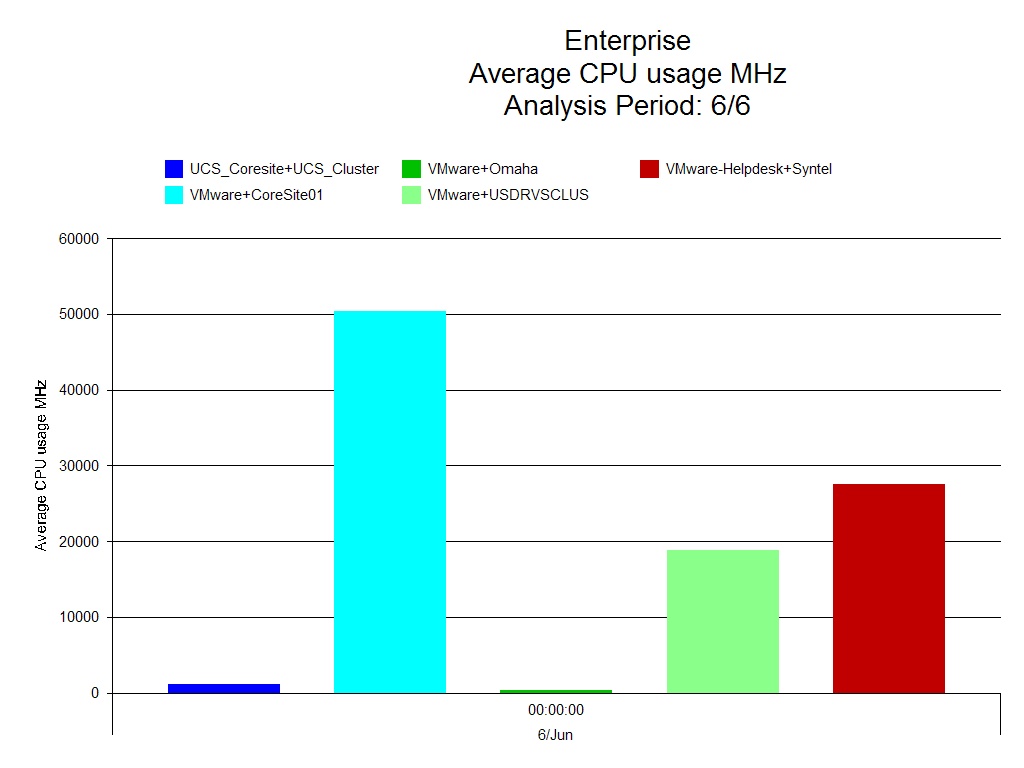
The first report below looks at the CPU usage of clusters in MHz. It is a simple chart and this makes it very easy to understand.
 
VMware – CPU Usage all Clusters

You can immediately see who the biggest user of the CPU is, Core site 01.
 
The next example is a trend report on VMware resource pool memory usage.
The light blue indicates the amount of memory reserved and the dark blue line indicates the amount of memory used within that reservation. This information is then trended going forward, allowing you to see at which point in time the required memory is going to exceed the memory reservation.
 
VMware – Resource Pool Memory Usage Trend
 
A trend report like this is useful as an early warning system, you know when problems are likely to ensue and can do something to resolve this before it becomes an issue.

We need to keep ahead of the game and setting up simple but effective reports, provided automatically, will help you to do this and to report back to the business regarding requirements well in advance.

On Thursday I’ll show you one final report on VMware, which looks at headroom available in the Virtual Center, in the meantime take a look at out VMware vSphere Capacity and Performance Essentials workshop.
http://www.metron-athene.com/services/online-workshops/index.html#vmwarevsphere

Charles Johnson
Principal Consultant